Trial and conversion
How the ADO Pilot free trial works and how to convert your trial into a paid subscription without losing your configuration.
Last updated
When you sign up, ADO Pilot gives you a free trial with a small allocation of review credits (RCs) so you can try the product without a card on file. When the trial RCs run out or the trial period expires, you add a payment method and pick a plan to keep reviewing.
Your free trial
- Free RCs. Your trial includes 20 review credits. No card on file is required to start.
- 14-day limit. The trial expires after 14 calendar days or when you exhaust the included RCs — whichever comes first.
- Configuration. All org, project, and repo settings you make during the trial are saved and survive the conversion to a paid plan.
Tracking your trial usage
While you're on the trial, the dashboard meters you against your 20-credit trial cap — not the paid plan's monthly allowance. The credit meter reads credits used out of 20, turns amber at 80%, and turns red once you reach the cap. The plan allowance you'll receive after subscribing is shown separately as a labeled "after you subscribe" preview, so the paid number stays visible without pretending to be your live trial balance.
A status strip across the dashboard shows how many trial credits you've used and how many days remain in your 14-day window, so you always know which limit — credits or time — you'll reach first. It escalates as you approach either limit and links straight to the Billing page to convert.
When your trial RCs run out
When you consume the last trial RC, ADO Pilot blocks new reviews and posts a status check on the affected PR. The block is the same hard-block behavior described in Overage behavior: no RC is consumed by the rejected review, and your data and configuration are untouched.
You can add a payment method any time before the trial ends without losing your trial setup — there's no separate grace period beyond the 14-day trial window itself. If no payment method is added by the end of the trial, the Stripe subscription is cancelled — your ADO org configuration and review history in ADO Pilot are retained, but you would need to re-subscribe to start reviewing again.
Converting to a paid plan
To convert:
Step 1 — Add a payment method
On the Billing page, click Add payment method in the Payment Method card. This expands an inline form — no redirect — where you enter your card number, expiration, security code, country, and ZIP/postal code, then click Save card. This saves your card for the charge at trial end — it doesn't start the paid plan by itself.
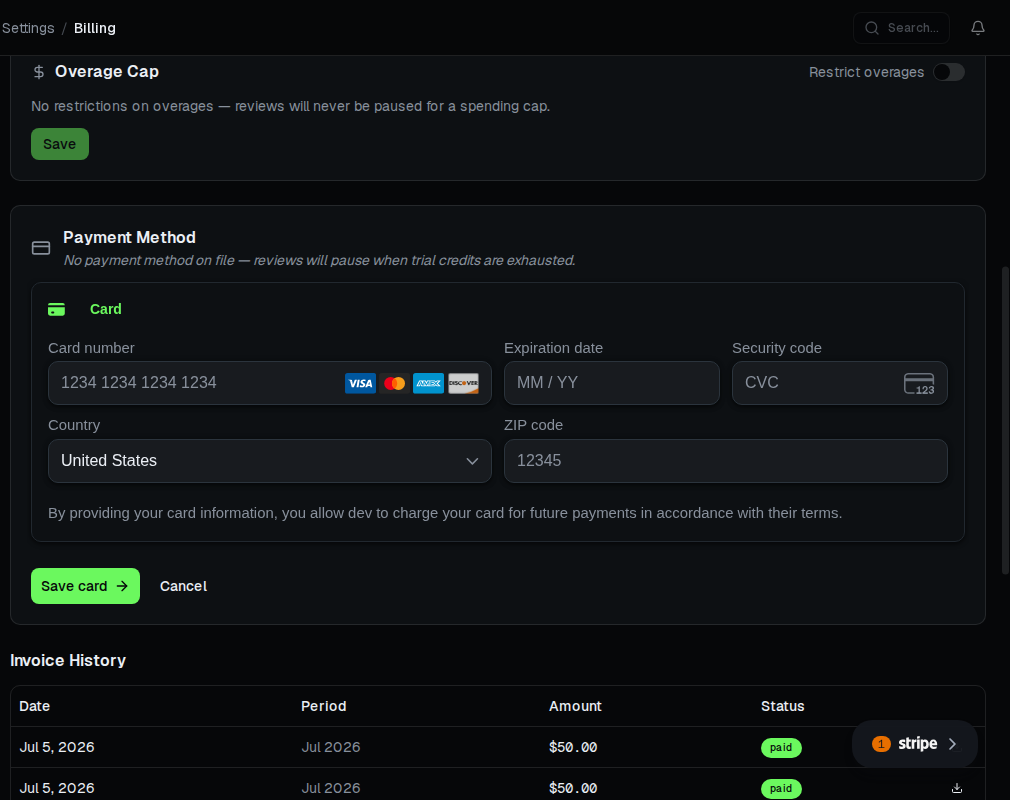
The inline form does not collect a full street address — only country and ZIP/postal code, which is enough for tax calculation. A separate billing address (for invoices) is set later through the Stripe billing portal — see Invoices and payment.
Step 2 — Confirm your plan
Review the plan comparison on the Billing page and confirm you're on the right plan — Starter, Team, or Business. See Plan tiers for the differences. Enterprise is a custom, contract-negotiated plan and isn't part of this self-service picker — contact sales to move to it.
Step 3 — Convert to paid
Your trial converts to paid automatically when Stripe charges your saved card at the end of the 14-day trial. To start the paid plan — and unlock its full RC allocation — sooner, click Upgrade now — end trial early on the Billing page.
Step 4 — Continue reviewing
Reviews resume on the new plan's included RC allocation once the trial converts to paid, whether that happens automatically at trial end or right away via Upgrade now — end trial early. Trial RC usage carries over into your first paid period; if you upgrade to a higher plan tier at the same time, your usage counter resets and you start with a full fresh allocation.
The first invoice charges the full amount of your first billing period, dated at trial end (or immediately, if you convert early). Your billing anchor is set to that date, and subsequent invoices land on it. See Billing periods.
What carries over from the trial
Everything except the trial RC balance carries over:
- Your service hook subscription in Azure DevOps stays installed.
- Org, project, and repo configuration you set during the trial — including exclusion patterns and review settings — is preserved.
- Review history from the trial remains visible.
You do not need to reinstall the extension or reconfigure anything to start a paid plan.
Cancelling after converting
Your paid plan starts once the trial converts — automatically at trial end, or right away if you use Upgrade now — end trial early. If you change your mind after converting, follow Changing your plan: you can cancel at period end to use up the period you paid for, or cancel immediately to stop further charges. Refund eligibility for the partial period depends on Stripe's standard policy and your region.