The ADO Pilot settings hub
Any organization member can view ADO Pilot subscription status, an aggregate connection-health summary, and trigger on-demand reviews from the settings hub.
Last updated
The ADO Pilot settings hub is a status and actions page under your Azure DevOps organization settings. It shows whether reviews are active for the organization, an aggregate connection-health summary, and lets you trigger an on-demand review for any open pull request. Any authenticated member of the organization can open it and use everything in it. Configuration tasks — adding projects, rotating credentials, editing per-repository settings — happen at the dashboard, not in the hub.
Who can open the hub
Any authenticated member of the Azure DevOps organization can open the hub and use everything in it — the status banner, the connection-health summary, and the Run a review form all work the same way regardless of your permission level. Reaching the hub URL at all already implies you have access to the organization.
Real Azure DevOps Organization Administrators additionally see a 🛡 Organization Administrator badge in the header. The badge is informational only — it confirms your permission level but doesn't unlock anything in the hub that other organization members don't already have.
Opening the hub
- Click the gear icon at the bottom of the Azure DevOps left navigation to open Organization settings.
- In the organization settings sidebar, click the top-level ADO Pilot entry. It appears as its own item in the sidebar — it is not nested under "Extensions".
The hub opens in the organization settings content area. While it loads it shows "Loading ADO Pilot settings...".
What the hub shows
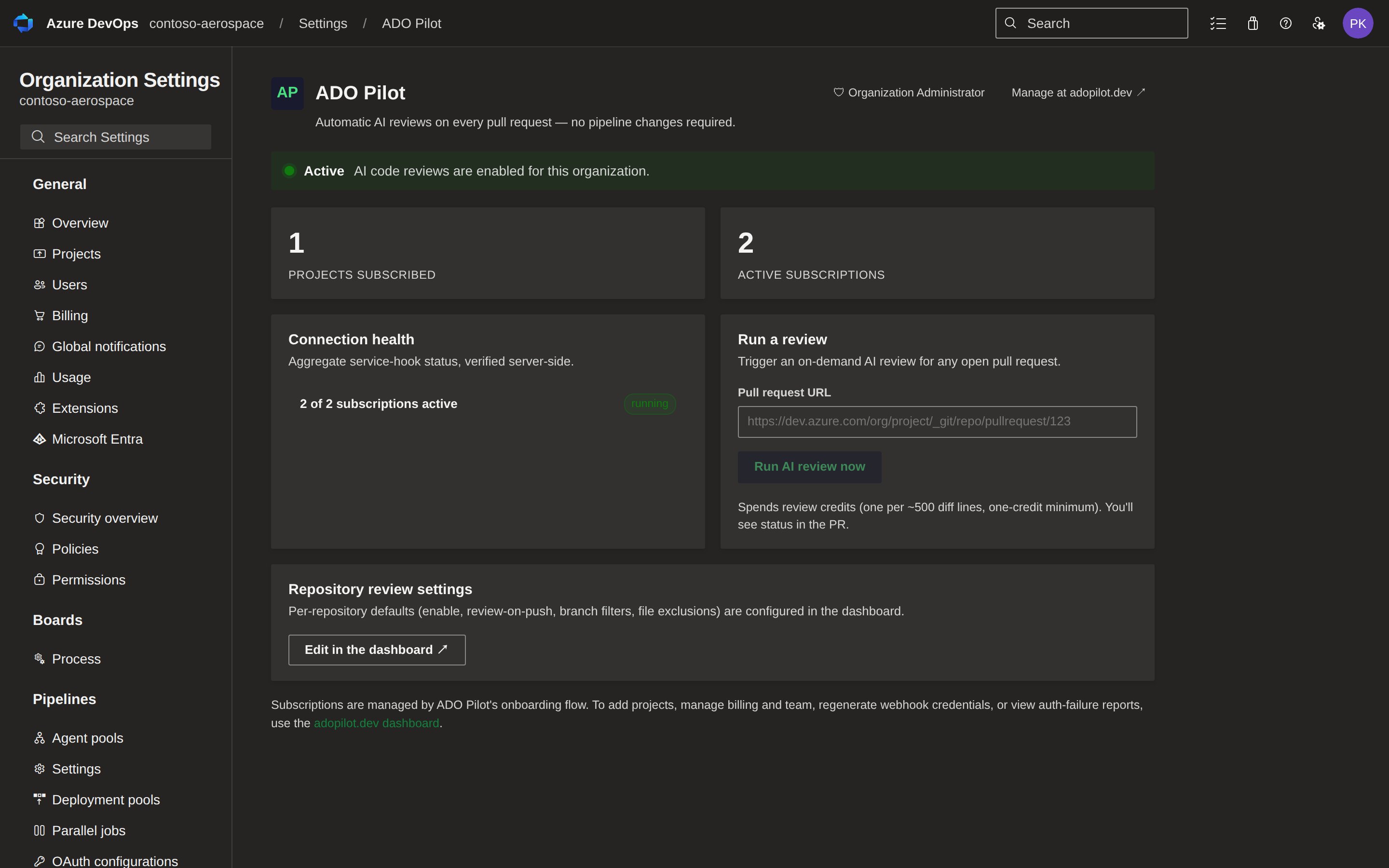
When loaded successfully, the hub renders a header, a status banner, and a repository settings card. When status is Active it also shows a connection health panel and a Run a review form.
Header
The header shows the ADO Pilot logo, the product name, and a link whose destination depends on status: Manage at adopilot.dev ↗ (opens the dashboard) when the org is Active, or Set up ADO Pilot ↗ (opens signup) when Not configured. If you are a real Organization Administrator, the header also shows a 🛡 Organization Administrator badge — it's informational only and doesn't change what you can see or do in the hub.
Status banner
A pill in the status area reads either Active or Not configured.
- Active appears when the backend has at least one service-hook subscription running for the organization. The banner reads "AI code reviews are enabled for this organization."
- Not configured appears when the extension is installed but no subscriptions exist yet. The banner reads "ADO Pilot is installed, but no subscriptions are active. Sign up at adopilot.dev to connect your organization and enable reviews." — "Sign up at adopilot.dev" is a hyperlink to signup, not to the dashboard.
The status reflects subscription state at the time the page loaded. Refresh the page to re-check.
Subscription counters
When the status is Active, the hub shows two counters below the status banner:
| Counter | What it counts |
|---|---|
| Projects subscribed | Distinct Azure DevOps projects in this organization that have at least one ADO Pilot subscription. |
| Active subscriptions | Total service-hook subscriptions across all projects in the organization. |
A project can have more than one subscription (one per supported event type), so "Active subscriptions" is normally larger than "Projects subscribed". The hub displays an em-dash for "Projects subscribed" when no distinct project could be attributed to a subscription — either because none have been subscribed yet, or because Azure DevOps did not return a project ID on the existing subscription rows. "Active subscriptions" can still be non-zero in that case even though "Projects subscribed" shows an em-dash.
Connection health
When the status is Active, the hub shows a Connection health panel reading "Aggregate service-hook status, verified server-side."
The panel shows one summary line — N of M subscriptions active — where M is the total number of service-hook subscriptions provisioned across the organization and N is how many of them are currently active. Next to the summary line, the hub shows exactly one status tag, chosen in this priority order:
| Tag | When it appears | Meaning |
|---|---|---|
| ⚠ paused — check adopilot.dev | ADO Pilot has paused webhook delivery for the organization. | Reviews will not fire until delivery resumes. Open the adopilot.dev dashboard to see why and resolve it. |
| ⚠ N disabled | Delivery is not paused, but one or more subscriptions is disabled. | Azure DevOps has stopped delivering events for those subscriptions; reviews on the affected projects may not fire. |
| ! none found | No service-hook subscriptions were found for the organization. | Reviews cannot fire until at least one subscription exists. If you see this on an Active organization, resync from the dashboard. |
| running | All subscriptions are active and delivery is not paused. | Service-hook delivery is healthy. |
This panel is aggregate-only — counts, not a per-project breakdown. For per-project subscription detail, use the adopilot.dev dashboard.
Legacy subscription warning: If any subscriptions were provisioned by versions of the extension prior to v0.1.8, a warning appears within the Connection health panel:
N legacy subscription(s) detected. Re-authenticate at adopilot.dev to migrate them.
Re-authenticating from the dashboard rotates the affected subscriptions to the current backend-owned format. Until you migrate, the legacy subscriptions continue to fire reviews and appear like any other subscription in the connection status shown on the dashboard's Integration page — they just aren't specially labeled as legacy there.
Run a review
When the status is Active, a Run a review form appears alongside the connection health panel. Use it to trigger an on-demand AI review for any open pull request without navigating to the PR.
- Paste the full pull request URL into the Pull request URL field. Example:
https://dev.azure.com/org/project/_git/repo/pullrequest/123. - Click Run AI review now.
The button shows "Starting…" while the request is in flight, then displays one of these outcomes:
| Outcome | Meaning |
|---|---|
| Review started | ADO Pilot is reviewing this pull request now. Inline comments and the status check will post in a few minutes. |
| Review already in progress | A review for this pull request is already running. Its comments will post shortly — no need to trigger another. |
| Too many review requests | You're triggering reviews too quickly for this pull request. Wait a moment and try again. |
| Review credits exhausted | This organization has used its review allowance for the current period. A dashboard link lets you manage your plan. |
| Couldn't authorize the review | We couldn't confirm your access to this pull request. Make sure you're signed in and can view this PR, then try again. |
| Your plan doesn't include this | On-demand reviews via a service principal need a higher plan for this organization. A link lets you manage your plan. |
| This organization is inactive | AI reviews are turned off for this organization. Check your subscription status to reactivate them. |
| Manual reviews are paused | An administrator has temporarily disabled on-demand reviews. Automatic reviews still run on every PR update. |
| Something went wrong | The review couldn't be started — usually temporary. Try again in a moment. |
The Run a review form only appears when status is Active, so the "Finish setting up ADO Pilot" (never-onboarded) outcome described in PR action menu cannot occur here — only in the PR's own action menu, which is not status-gated.
Each review triggered from the hub spends review credits — one per ≈500 billable diff lines, one-credit minimum, same as any other review. See Review credits explained.
Repository review settings
A card in this position always appears, but its content depends on status:
- Active — a Repository review settings card reads "Per-repository defaults (enable, review-on-push, branch filters, file exclusions) are configured in the dashboard." An Edit in the dashboard button opens
https://app.adopilot.dev/dashboardin a new tab. - Not configured — the card becomes a Get started card instead: "Sign up to connect this organization, choose the repositories you want reviewed, and start your free trial. Reviews begin posting on new pull requests within minutes." A Sign up at adopilot.dev ↗ button opens signup in a new tab.
Per-repository settings are not editable in the hub in either state — the hub is a status and trigger surface only.
Footer
The footer text depends on status:
- Active — repeats the dashboard link: "Subscriptions are managed by ADO Pilot's onboarding flow. To add projects, manage billing and team, regenerate webhook credentials, or view auth-failure reports, use the adopilot.dev dashboard."
- Not configured — points to signup instead: "New to ADO Pilot? Sign up at adopilot.dev to connect this organization, pick the repositories you want reviewed, and start your free trial."
Why configuration lives at app.adopilot.dev
The extension does not hold the personal access token (PAT) used to provision subscriptions, and it does not hold any backend API key. Subscription provisioning, PAT rotation, and webhook credential regeneration all happen at the dashboard:
- Rotate the PAT: dashboard → Settings → Integration → Rotate PAT.
- Resync webhook delivery: dashboard → Settings → Integration → Resync.
- Manage projects and per-repository settings: dashboard → Repositories.
- Cancel or change your plan: dashboard → Settings → Billing (opens the billing portal).
If the hub shows an error
If status loading fails, the hub renders an error banner with the underlying message and a Retry button. Retrying re-runs the status check. Common causes:
- Your Azure DevOps session token couldn't be minted, or was rejected — sign out of Azure DevOps and back in, then retry.
- ADO Pilot's backend is momentarily unreachable.
- ADO Pilot's backend couldn't reach Azure DevOps to read your subscription status — this can happen during a transient Azure DevOps outage.
- A brief rate limit from refreshing too many times in quick succession — wait a moment and try again.
If retrying does not help, open the adopilot.dev dashboard. The dashboard works independently of the hub.