Using the PR action menu
The ADO Pilot Run AI Review entry opens a confirm dialog that starts an on-demand review of the current pull request. Automatic reviews run on every update.
Last updated
When the ADO Pilot Marketplace extension is installed, a Run AI Review entry appears in the pull request action menu. Selecting it opens a small confirmation dialog that starts an on-demand review of the pull request you are looking at. Automatic reviews still fire on every pull request create and update — this action is for when you want a review right now without pushing a new commit.
Where the entry appears
The Run AI Review entry is contributed under the pull request action menu — the three-dot overflow menu that hosts actions such as Mark as draft and Abandon. It is only visible when the ADO Pilot extension is installed in your organization. If you do not see it, see Installing and sharing the extension.
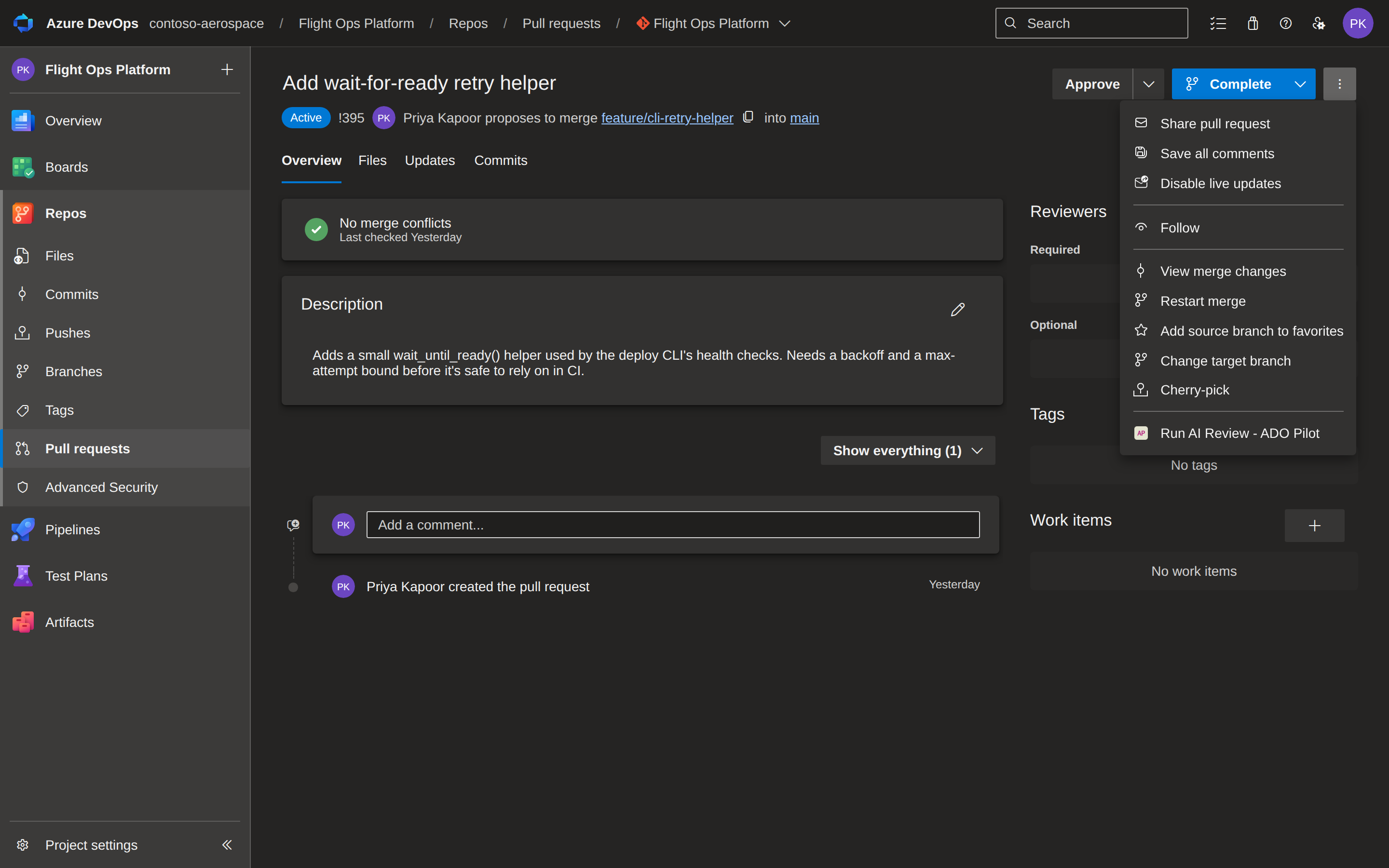
What you see when you open it
The entry opens a confirmation dialog:
Run an AI review of pull request #123 now?
with two buttons, Run review and Cancel. Cancel dismisses the dialog and does nothing — no review, no credit. Run review starts the review.
If Run review is greyed out, the dialog has not yet received the pull request context from Azure DevOps. Close it and reopen it from the pull request page.
After you click Run review
The dialog shows "Starting the review…" and then settles on one of these results:
- Review started — ADO Pilot is reviewing the pull request now. Inline comments and the status check post in a few minutes.
- Review already in progress — you clicked Run review again within the same dialog session. That repeated click is collapsed server-side, so you are not charged again. A deliberate re-run (a fresh dialog, or a new push) starts a new review and consumes review credits.
- Too many review requests — you're triggering reviews too quickly for this pull request. Wait a moment, then close the dialog and reopen it from the pull request page to try again.
- Review credits exhausted — your organization has used its review allowance for the current period. A Manage your plan at adopilot.dev link appears so a billing owner can top up or change the plan.
- Couldn't authorize the review — ADO Pilot could not confirm that you can view this pull request. Make sure you are signed in and have access to the PR, then use Try again.
- Finish setting up ADO Pilot — this organization hasn't completed onboarding yet, so there is no ADO Pilot account to review against. A Sign up at adopilot.dev link starts signup; no credit is used.
- Your plan doesn't include this — on-demand reviews via a service principal need a higher plan for this organization. A Manage your plan at adopilot.dev link appears so a billing owner can upgrade.
- This organization is inactive — AI reviews are turned off for this organization. A Manage your plan at adopilot.dev link lets you check subscription status and reactivate them.
- Manual reviews are paused — ADO Pilot has temporarily suspended on-demand reviews on the backend. Automatic reviews still run on every pull request update.
- Something went wrong — usually a transient problem. Use Try again in a moment.
A Close button dismisses the dialog. Where a Try again button is shown, it re-sends the same request, so retrying after a transient error does not double-spend a credit.
How this relates to automatic reviews
Automatic reviews are unchanged: ADO Pilot reviews every pull request when it is created and again whenever you push a new commit (the backend listens for git.pullrequest.created and git.pullrequest.updated service-hook events). The Run AI Review action is an explicit, on-demand trigger on top of that — useful when you want a fresh review without making a commit. Pushing a commit to the source branch remains an equally valid way to re-run a review.
Frequently asked questions
Does opening the dialog cost a review credit? No. Only clicking Run review starts a review, which spends review credits (one per ≈500 billable diff lines, one-credit minimum). Opening the dialog and clicking Cancel costs nothing.
I clicked Run review twice — was I charged twice? No. A repeated click on the same dialog is de-duplicated server-side; you will see "Review already in progress" rather than a second review.
Can I disable the entry without uninstalling the extension? No. The entry is part of the extension's contributions; uninstalling the extension is the only way to remove it. See Uninstalling the extension. If you see "Manual reviews are paused", ADO Pilot has temporarily suspended on-demand reviews on the backend — automatic reviews on PR create and update continue normally and no action is needed on your part.