Manual vs automatic reviews
Control when ADO Pilot reviews — reviewOnPush gates push-triggered reviews, or trigger on demand from the PR action menu or Settings Hub.
Last updated
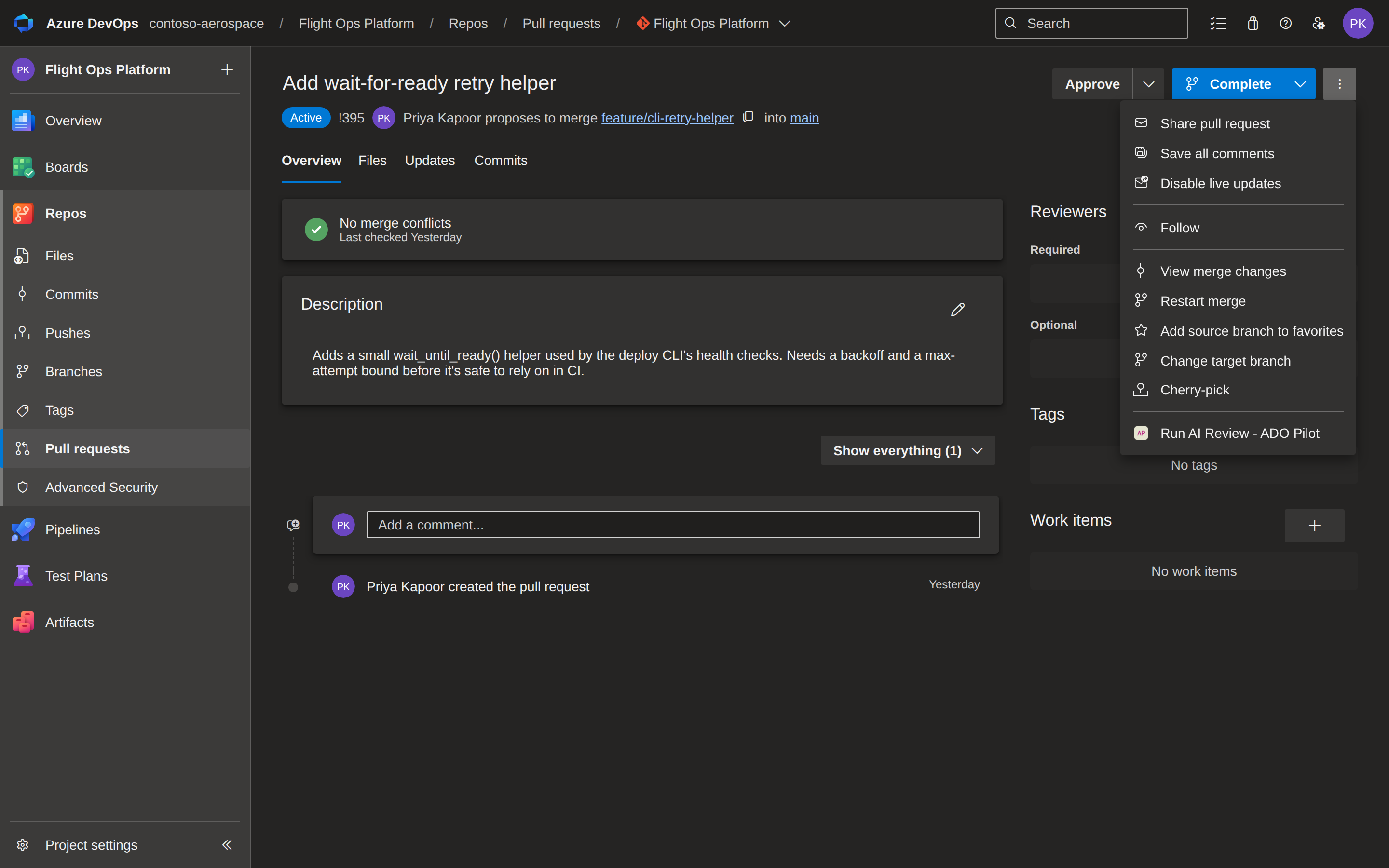
ADO Pilot reviews automatically when a PR is created or updated. You can also trigger a review on demand — without pushing a new commit — using the Run AI Review entry in the pull request action menu or the Run a review form in the Settings Hub.
The trigger settings
| Field | Type | Default | Scope | Status |
|---|---|---|---|---|
reviewOnPush | boolean | true | Org / project / repo | Active |
allowManualInvocation | boolean | true | Org only | Stored, not yet enforced |
reviewOnPush uses override semantics — the most-specific scope wins. allowManualInvocation is stored with your configuration but the review engine does not yet read it; changing it has no effect on whether manual triggers are accepted. See Org, project, and repo settings hierarchy.
Automatic reviews
ADO Pilot always starts a review when a pull request is created with a target branch matching your branch filter. reviewOnPush controls only whether a new review also runs when a commit is pushed to an existing open PR.
When reviewOnPush is true, ADO Pilot starts a review whenever:
- A pull request is created with a target branch matching your branch filter, or
- A new commit is pushed to the source branch of an open PR.
A typical timeline:
13:00  Create PR from feature/login into main
13:01  ADO Pilot posts the AI review status check and inline comments
13:15  Push a new commit to feature/login
13:16  ADO Pilot re-reviews; the status check resets to pending, then resolves
To stop reviews on push, set reviewOnPush: false at the scope you want to affect. ADO Pilot will still review when the PR is first created.
Manual reviews
You can trigger an on-demand review in two ways without pushing a new commit:
From the PR action menu
The Run AI Review entry appears in the pull request action menu — the three-dot overflow (⋮) that also contains items like Mark as draft and Abandon. Selecting it opens a confirm dialog:
Run an AI review of pull request #123 now?
Click Run review to start. Click Cancel to dismiss with no charge. The dialog then shows one of these results:
- Review started — the review is running. Inline comments and the status check post in a few minutes.
- Review already in progress — clicking again within the same dialog session collapses the duplicate server-side, so you are not charged again. A deliberate re-run (a fresh dialog, or a new push) starts a new review and consumes review credits.
- Too many review requests — you're triggering reviews too quickly for this pull request. Wait a moment and try again.
- Review credits exhausted — your organization has used its allowance for the current period. A link to adopilot.dev appears so a billing owner can update the plan.
- Couldn't authorize the review — ADO Pilot could not confirm access to this PR. Use Try again after re-verifying access.
- Manual reviews are paused — the operator-level manual-trigger kill switch is active. Automatic reviews still run on push.
- Finish setting up ADO Pilot — this organization hasn't completed onboarding yet. A link takes you to sign up.
- Your plan doesn't include this — on-demand reviews need a higher plan for this organization.
- This organization is inactive — AI reviews are turned off; check your subscription status to reactivate them.
- Something went wrong — transient error. Use Try again.
From the Settings Hub
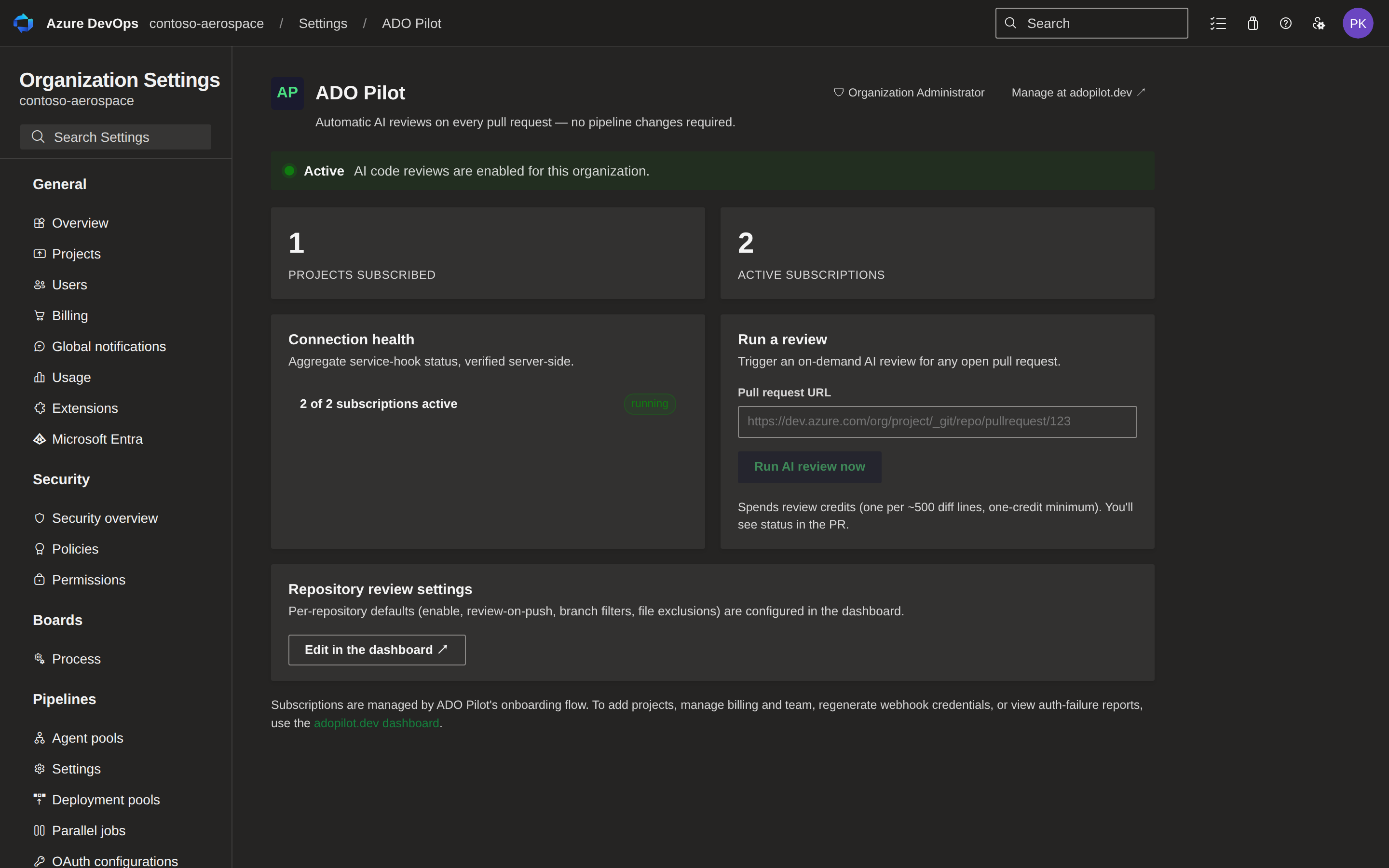
When ADO Pilot is active for your organization, the Settings Hub (Organization settings → ADO Pilot) includes a Run a review form. Paste any open pull request URL and click Run AI review now. Once a review is triggered, outcome messages are identical to those in the PR action menu dialog. Because this form also has to resolve the pasted URL to a specific organization, repository, and PR, it can additionally show a URL-validation error, such as "That doesn't look like a pull request URL" or "Couldn't find that repository."
This form is useful for administrators who want to trigger a review on any PR in the organization without navigating to the PR itself.
Common configurations
Default — automatic on every push. Recommended for most teams.
reviewOnPush: true
Disabled on push. Stops automatic reviews on every commit push; ADO Pilot still reviews when the PR is first created. Manual triggering (via the PR action menu or Settings Hub) is also still available while reviewOnPush: false.
reviewOnPush: false
Disabled. Equivalent to setting enabled: false on the repository.
enabled: false
How auto-review interacts with other settings
| Condition | Auto-review |
|---|---|
Repository enabled: false | Skipped |
Branch outside targetBranchFilters | Skipped |
reviewOnPush: false (push only) | Skipped |
| Review-credit (RC) quota exhausted | Fails |
Cost
Every review consumes RCs regardless of what triggered it — automatic reviews and manual on-demand reviews spend credits at the same rate. For pricing details, see review credits.
When to turn auto-review off
Most teams should leave reviewOnPush: true and use branch filters to narrow the set of PRs that get reviewed. Setting reviewOnPush: false stops push-triggered reviews for the affected scope, but PR-creation reviews still run and manual on-demand triggers via the PR action menu and Settings Hub remain available.
Turning off auto-review is most useful during onboarding or while evaluating the tool on a subset of repositories. For everyday operation, narrowing branch filters is a finer-grained tool than disabling auto-review.